Welcome To Passport Seva
The Passport Seva Project (PSP) is an online service started by the Ministry of External Affairs (MEA) of India to make passport-related work easier for people in India. It helps citizens apply for a passport and use related services in a simple and smooth way. It reduces the need to visit passport offices again and again while providing a clear, fast, and easy process for everyone.
Quick Links


Know About Our Services
What is Passport Seva Project (PSP)?
The Passport Seva Project (PSP) is a government service by the Ministry of External Affairs (MEA) that makes passport-related work easy and online. It allows users to apply for a passport, book appointments, track application status, and use other services, helping save time and reduce office visits.
Services Offered by Passport Seva
Passport Seva offers online services such as applying for a fresh or Tatkaal passport, applying for a diplomatic passport, checking appointment availability, and tracking application status, and more.
- Apply for Fresh / Reissue Ordinary Passport
- Tatkaal Passport
- Apply Passport Abroad
- Apply for Police Clearance Certificate
- Apply for Diplomatic/Official Passport
- Apply For Surrender Certificate
- Track Application Status
- Check Appointment Availability
- Line of Control (LoC) Permit
- Fee Calculator
- Check Passport Offices in India
- Locate Passport Seva Kendra
- Know your Police Station
- Locate Common Services Centre
- Document Required for Fresh Passport
- Document Required for Re-issue of Passport
- Document Required for PCC
- Document Required for Diplomatic/Official Passport
- Mission/Post Abroad
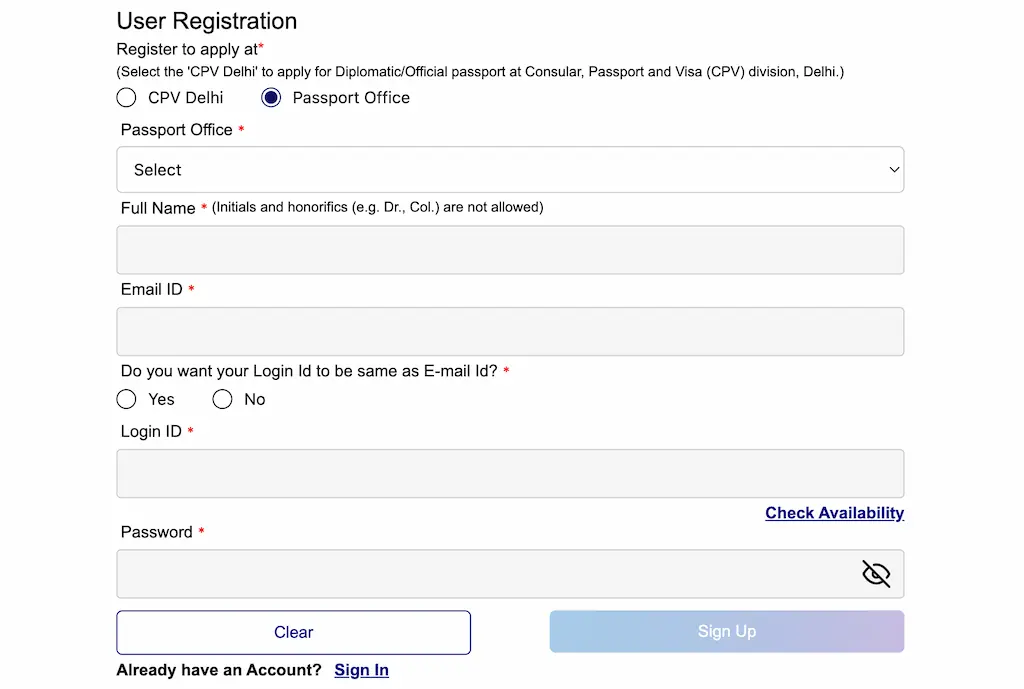
Passport Seva Registration Process
To Register on the Passport Seva portal, please follow these steps:
- Visit https://passportindia.gov.in portal.
- On the homepage > Click Register button.
- For a normal passport: Select Passport Office.
- For a Diplomatic/Official passport: Select 'CPV Delhi'.
- Enter your full Name (according to documents) & Email Id.
- If you want to use your email Id as your login Id, select Yes.
- Next, Enter a password and click the Sign Up button.
- Enter the OTP sent to your email Id and click Complete Sign Up.
How to Apply Fresh Passport?
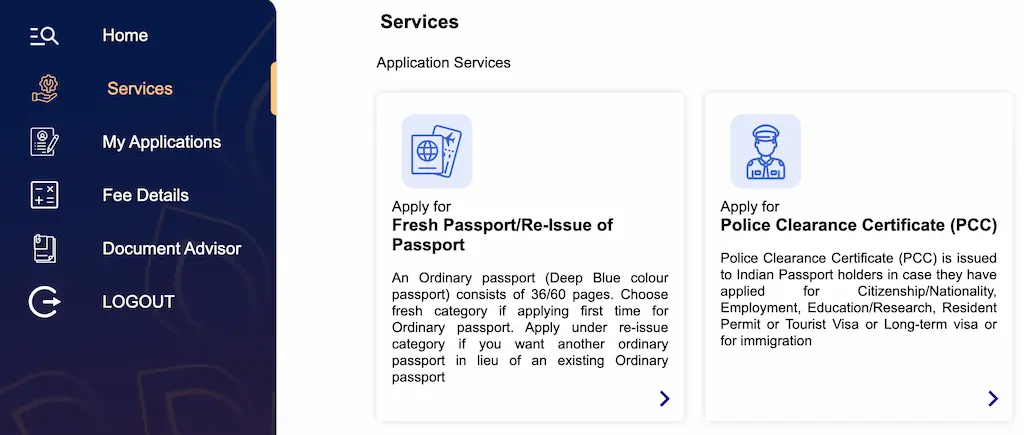
To apply fresh passport on the Passport Seva portal, please follow these steps:
- Visit https://passportindia.gov.in portal & login to your account.
- Go to Services section > Apply for Fresh Passport / Re-issue of Passport.
- After that, select the passport office > choose the apply type, application type, passport booklet, and click Save and Next.
- Enter your personal details such as (full name, gender, date and place of birth, marital status, etc.).
- Now, fill in your family details, (father’s, mother’s, and spouse’s name, etc.).
- Give your full address details and select your nearest police station for verification.
- Next, enter your emergency contact details & complete all queries.
- Verify passport details and select proof of birth (PAN/10th Marksheet, etc.) & proof of address (Aadhaar card/Ration card, etc.) documents.
- Preview your application carefully, select Agree, and click the Submit button.
- Pay the fee, book an appointment at the nearest PSK, and carry the receipt on the appointment day.
Required Documents
- Tick the checkbox next to any number you do not recognize from the list.
- Select the option for that number: Not My Number (if the number is not yours) or Not Required (if the number is unused).
- Fill in the reason for the report or additional information if required.
- Submit your complaint by pressing the Report button.
- Click OK in the confirmation pop-up, and your case will be forwarded to the concerned service provider, and the number will be blocked after some time.

Track Your Passport Application
If you want to block your lost/stolen mobile phone through Sanchar Saathi portal, please follow the following steps:
- In case of lost/stolen of a mobile phone, first of all, go to your nearest Police Station (with mobile IMEI number) and file a report of the mobile phone lost or stolen.
- After the report is registered, you must obtain the police complaint number from the police station.
- After this process, you have to open the https://ceir.sancharsaathi.gov.in/ portal on any other device.
- Now you have to click on the "Block Stolen/Lost Mobile" button visible in the menu section.
- On clicking, a new page will open in front of you, in which you will have to enter information related to your mobile and yourself.
- Device Information: In this section, you have to enter mobile related information like Mobile Numbers, Device IMEI Numbers, Device Brand, Device Model, Device Invoice and Mobile Price etc.
- Lost Information: In this section, you have to enter information related to mobile lost/stolen like Lost Place, Lost Date, State, District, Nearest Police Station, Police Complaint Number and Upload Police Complaint etc.
- Mobile Owner Personal Information: In this section, you have to fill information about yourself like Device Owner Name, Address, ID Proof, Email ID, Captcha and Mobile Number for OTP etc.
- Filling all the details carefully, you need to tick the declaration form and click on the "Proceed" button.
- After the form is successfully submitted, a Request ID will be generated, with the help of which you can check the status of your Application.


Online Fraud and Consumer Protection Data
| Service | Details |
|---|---|
| Block Your Lost / Stolen Mobile Handset | 38.19 lakh mobiles blocked 23.28 lakh mobiles traced |
| Know Mobile Connections in Your Name | 245.75 lakh requests received 205.08 lakh requests resolved |
| Chakshu - Report Suspected Fraud Communication | 5.09 lakh inputs received 34.95 lakh actions taken |
Note: This table is based on Sanchar Saathi data and was last updated on 20th September 2025.
How can you avoid SIM/Mobile fraud?
In today's online world, if you want to protect yourself from problems like phishing, scams and money fraud, then follow the following steps:
- Always buy SIM from Authorized Telecom Shop only.
- If for some reason you want a duplicate SIM, always get it from the official store.
- Never share your mobile number and personal details on suspicious websites and apps.
- Regularly check the TAFCOP portal to see if there are any unauthorized numbers active on your ID. If there are, report them.
- Always lock your phone with a password, PIN, or fingerprint.
- Keep Bluetooth, Wi-Fi etc. switched off when not in use.
- Always download applications from Trusted Sources.
Frequently Asked Questions
TAFCOP (Telecom Analytics for Fraud Management and Consumer Protection) is a DoT portal that lets you check how many mobile numbers are registered on your ID and helps report unauthorized or fraudulent SIMs issued in your name.
Yes, with the help of Sanchar Sathi portal you can block or unblock your lost/stolen mobile phone.
Telephone Number: 011-20907480
Email Id: help-sancharsaathi@cdot.in
Director, AI & DIU: Naveen Jakhar, I.T.S. (DoT), Ministry of Communications, Govt. of India